Graph Architecture is one of the interactive graphs Understand can draw of your code — call trees, dependencies, control flow, and more.
Graph Architecture
| Targets | Architectures |
| Languages | Any |
| Variants | Classic Compare |
Show the selected architecture's hierarchy of child architectures and, optionally, the entities directly contained in each.
The root node is the selected architecture — a directory, or any other architecture defined for the project. Each child architecture is shown as its own node, connected by an edge to its parent, mirroring however the architecture is organized (by directory, by language construct, or by a custom grouping). Architecture nodes that contain entities are expandable. Expanding it shows the entities directly belonging to it, such as the files inside a folder.
Graph Architecture - Classic
See the Dependencies or File Dependencies graphs to explore how these same architectures depend on each other.
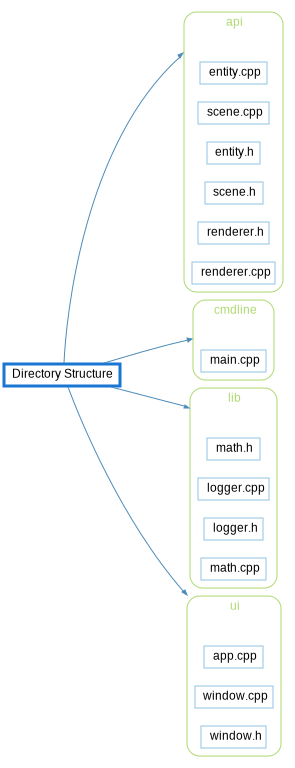
Rooted at Directory Structure below — the same sample
project used by the Dependencies graphs — the graph shows the four top-level
folders lib, api, ui, and cmdline,
each expanded to list its own files: lib contains logger.h,
logger.cpp, math.h, and math.cpp;
api contains entity.h, entity.cpp,
renderer.h, renderer.cpp, scene.h, and
scene.cpp; ui contains window.h,
window.cpp, and app.cpp; and cmdline
contains main.cpp.
Graph Architecture - Compare
See the Dependencies or File Dependencies graphs to explore how these same architectures depend on each other.
The Compare variant shows how the graph has changed relative to the project's comparison database.
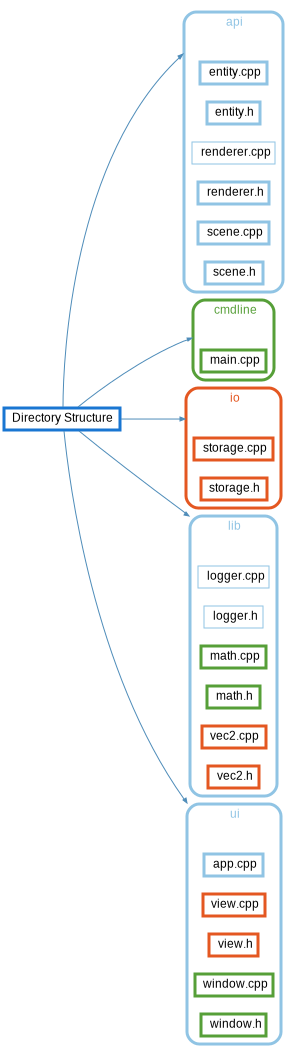
The graph below is rooted at Directory Structure in the
same sample project used by the Dependencies graphs. Its comparison database is
an earlier version of the project. Since then, the io folder was
removed, the cmdline folder was added, lib/vec2 was
renamed to math, ui/view was renamed to
window, and the Entity members speed and
move() were renamed to velocity and
update().
Added architectures and files are green and removed ones are red, so each
renamed file appears twice: once removed under its old name and once added under
its new one. Files whose contents changed have a thick border and unchanged files
have a thin one. The member renames change entity.h,
entity.cpp, scene.cpp, and app.cpp; the
file renames change the includes in entity.h,
renderer.h, and app.cpp; and removing io
changes scene.h and scene.cpp, which used it to save
the scene.